banany.lol: a free blog from a single markdown file
2026-11-19, originally published on pablomurad.com.
Most ways to start a blog begin with a sign-up form: an email, a password, a confirmation link, then a dashboard full of settings. banany.lol asks for a name and a text file. That's the whole setup.
It turns one markdown file into a blog with an RSS feed. It's free, it has no ads, no tracking scripts, no accounts and no cookies. It's part of runv.club, the public Unix server I run, and this post walks through how to use it from start to finish.
What comes with it #
- A blog at
banany.lol/yourname. - An RSS feed, so people can follow it from any feed reader.
- A light theme, a dark theme, or one that follows each reader's system.
- Nothing else to manage. No account, no dashboard, no plugins to update.
Step 1: pick a name #
On the home page, type a name after banany.lol/, add a title if you like, and press Create.
The page answers with the handle, the blog's address and a token. The token is a long password that proves the blog is yours, and it's the only way to publish to it. It shows up once, right there, and never again. Copy it somewhere safe, like a password manager: a lost token can't be recovered or reset, and anyone who has it can replace the blog.
Step 2: write the file #
The whole blog lives in one markdown file. The rules fit in three lines:
- Everything before the first post becomes the intro at the top of the blog.
- Each post starts with a small block between two
---lines, holding itstitleanddate. - An optional block at the very top sets the theme:
auto,lightordark.
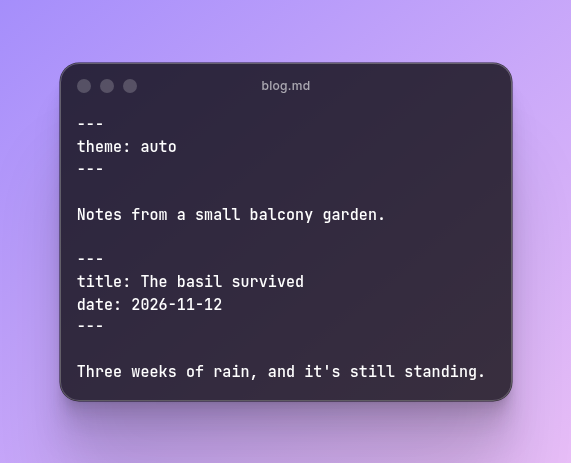
Here's a complete file:
---
theme: auto
---

Notes from a small balcony garden.

---
title: The basil survived
date: 2026-11-12
---

Three weeks of rain, and it's still standing.

---
title: First tomato
date: 2026-11-19
---

Small, a bit sour, and completely worth it.
Below each post's block goes regular markdown. Images work too, as long as they're hosted on another site with an https address.
Step 3: publish #
Back on the home page, fill in the handle and token, then drag the .md file onto the box that says "drop your .md file here". The page answers with how many posts it published and the blog's address.
The home page sends the file to a small API, and from the terminal curl can do the same:
curl -X POST \
  -H "x-blog-token: YOUR_TOKEN" \
  -F "file=@blog.md" \
  https://banany.lol/api/blogs/yourname/publish
Every upload replaces the whole blog with the new file. To add a post, add it to the file and upload it again. To fix a typo, fix it in the file and upload again. To delete a post, remove it from the file and upload again.
Why one file works well #
Having the whole blog in a single text file has some nice side effects:
- The backup is the file itself. A copy on the computer holds everything.
- Any editor works, from Vim to the notes app on your phone.
- It fits in git, with every change ever made.
- Moving somewhere else is easy, since every post is already in plain markdown.
That first point matters, because banany.lol comes with no warranty: it's a free service, and the terms ask each owner to keep a copy of the file.
The limits #
banany.lol is free for everyone, so it has a few limits to keep it fair:
- Each connection can create 2 blogs every 30 days.
- The file can be up to 1 MB. That's a lot of text: a long post is a few dozen KB.1
- A blog can have up to 300 posts.
And the usual rules apply: nothing illegal, no spam or link farms, no harassment, no impersonation, no malware. To report a blog that breaks them, write to abuse@runv.club with its address.
What it keeps #
Very little, and the privacy page lists all of it:
- Request logs with IP address, date and time, kept for 6 months, because Brazil's Marco Civil da Internet requires it.2
- A keyed hash of the IP3 when a blog is created, used only for the 2-blogs limit and deleted after 30 days.
- The token, the file and the pages made from it, for as long as the blog exists.
No accounts, no email, no analytics, no cookies. The light and dark switch saves the choice in the reader's own browser and nowhere else.
One thing to keep in mind about images: if a post shows an image from another site, the reader's browser loads it straight from there, and that site sees the reader's IP address. That's true anywhere on the web, but it's worth knowing when choosing where to host images.
And runv.club? #
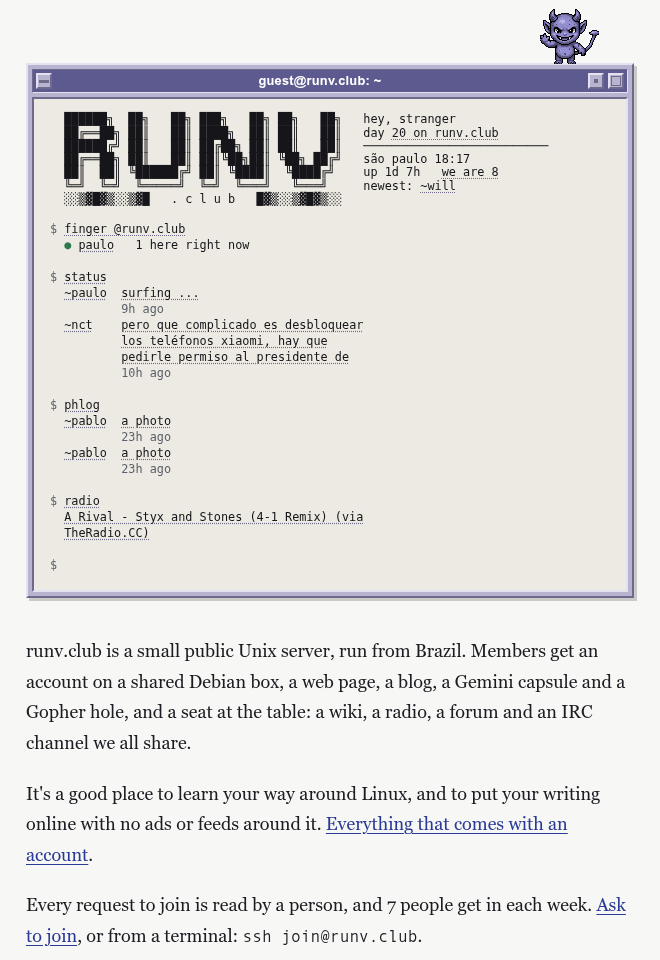
runv.club is a small public Unix server, run from Brazil. Members get an account on a shared Debian machine, a web page, a blog, a Gemini capsule and a Gopher hole,4 plus a wiki, a radio, a forum and an IRC channel that everyone shares. A person reads every request to join, and seven people get in each week. The request can go through the website or a terminal, with ssh join@runv.club.
banany.lol needs none of that: no account and no shell, only the file. For anyone who wants more than a blog, runv.club is the place to ask.
A note: this is the first post on this blog with margin notes. I may go back to some older posts and update them with more references and information.
Notes
-
Plain English text takes about one byte per character, so 1 MB holds around a million characters, roughly the length of a long novel. ↩
-
Article 15 of Law 12.965/2014 requires application providers to keep access logs for six months, under confidentiality. The privacy page cites the same article. ↩
-
A keyed hash, or HMAC, mixes the address with a secret that only the server knows. The result can't be turned back into the IP, but the same IP always gives the same result, which is all a limit needs. ↩
-
Gopher (1991) and Gemini (2019) are small protocols for text sites that live alongside the web. A Gemini site is called a capsule, and a Gopher site a hole. ↩
Original: https://pablomurad.com/banany-lol-a-free-blog-from-one-markdown-file/