Getting started with Kitten, a kit for the Small Web
2026-11-01, originally published on pablomurad.com.
Kitten is a small web server and development kit that turns a folder of HTML, CSS and JavaScript files into a website or a web app. Drop an index.html in a folder, type kitten, and it's live at https://localhost, with a real HTTPS certificate. Write a .page.js file instead and that's a dynamic page. One more line saves the data in a database that's already built in. Something shows up on the screen without a build step, a config file or a framework to learn first.
It's made by the Small Technology Foundation, a tiny not-for-profit, and it's free software under the AGPL 3.0. The source lives on Codeberg.
What the "Small Web" part means #
Kitten calls itself "a Small Web development kit", and that name explains who it's for.
Most of the web today is what the people behind Kitten call the Big Web: a few huge platforms where millions of people live inside one company's servers, under that company's rules. The Small Web is the opposite idea. Each person has their own small place on the web, a site or app that belongs to one person, runs on their own domain, and talks directly to other people's places.
Kitten is built for that. It can serve a plain static site like any web server, but it also comes with things that normally need gluing together by hand: a database, sessions, WebSockets, authentication and public key cryptography, for peer-to-peer apps where two Small Web places talk to each other directly.
Who it's for #
Kitten is a good fit if you:
- know some HTML, CSS and JavaScript and want to build something without learning React, a bundler and a cloud platform first;
- want a personal site or a small app that you own and host yourself;
- like the idea of an app that belongs to one person, like a private guestbook, a chat between two people or a tool just for you;
- are teaching or learning web development and want students to see results in minutes.
It's probably the wrong pick for serving millions of users from one app, for a "serverless" deploy, or for a client project that needs stability today. The project says itself that Kitten "is still a baby" and that breaking changes will come until API version 1.
What it needs #
Kitten runs on Linux and macOS. It needs Bash 5 or newer and a few common tools: git, tar, tee and xz. Most Linux distributions already have all of them.
On macOS, keep in mind that the Bash that comes with the system is the old 3.2 version, so a newer one is needed (Homebrew's bash package works).
For running a site in production, only Linux with systemd is supported.
Installing #
The quickest way is to pipe the installer into Bash:
wget -qO- https://kittens.small-web.org/install | bashTo avoid running scripts straight from the internet (fair), clone the repository, read the install script and run it yourself:
git clone https://codeberg.org/kitten/app kitten
cd kitten
./install
Check that it worked with kitten --version. Later, kitten update updates it and kitten uninstall removes it along with its data, after asking first.
A first page #
Create a folder with a single HTML file in it:
mkdir kitten-playground
cd kitten-playground
echo "<h1>Hello from Kitten</h1>" > index.html
kitten
Now open https://localhost in the browser and the page is there.
Notice there's no certificate warning. On its first run, Kitten creates a local certificate authority and adds it to the system's trust store (and to Firefox and Chrome, if they're installed), so the machine serves real HTTPS in development, just like a server would in production. The operating system asks for permission before that.
kitten with no arguments serves the current folder. It also takes a path, like kitten ~/sites/blog. To stop the server, press Ctrl+C.
A page that does something #
Rename index.html to index.page.js and replace its content with this:
let count = 1

export default () => kitten.html`
<page title='Kitten count'>
<h1>Kitten count</h1>
<p>${'🐱'.repeat(count++)}</p>
`
Run kitten again and refresh the page a few times. Each refresh adds a kitten.
A few things are happening in those lines.
Kitten uses the file system as its router. index.page.js answers at /, and a file called about.page.js would answer at /about. A page is a JavaScript module that exports a function, and whatever HTML that function returns goes to the browser.
The HTML goes inside kitten.html and a pair of backticks. That's a normal JavaScript template string, but kitten.html cleans anything inserted into it, which protects against cross-site scripting (someone sneaking a script into a page through a form or a URL). HTML returned in a plain string loses that protection, so get used to kitten.html from day one.
The <page> tag sets the things that normally live in the <head> of a page, like the title, the language and the icon. It can also switch on the libraries Kitten supports out of the box. Without a title, Kitten uses the first <h1>.
Saving data #
Stop the server and start it again. All the kittens are gone, because count only lived in memory. Fixing that takes one line:
kitten.db.kittens ??= { count: 1 }

export default () => kitten.html`
<h1>Kitten count</h1>
<p>${'🐱'.repeat(kitten.db.kittens.count++)}</p>
`
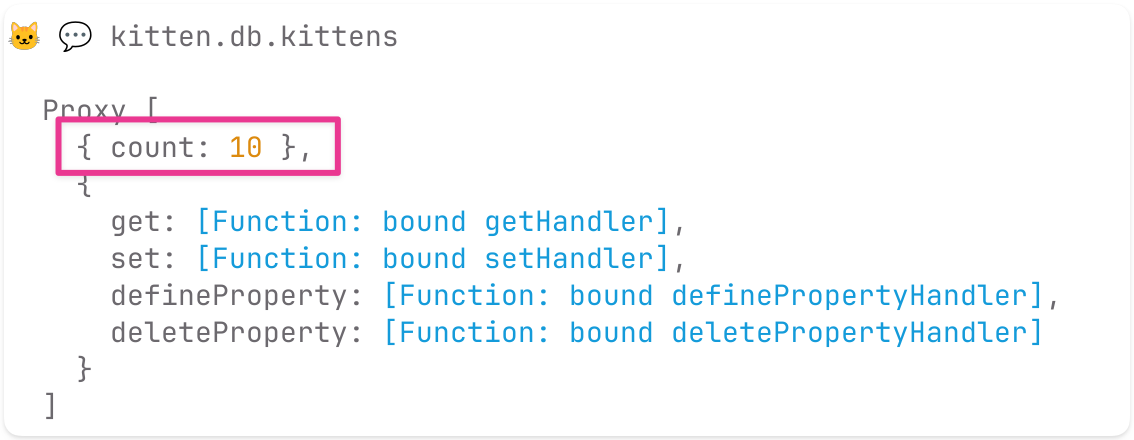
kitten.db is Kitten's built-in database, called JSDB. It works like a regular JavaScript object and saves itself to disk. The ??= in the first line means "create it only if it doesn't exist yet", so the count isn't reset every time the server starts.
Restart the server and the kittens are still there. JSDB saves each table as a plain JavaScript file in the app's data folder, readable in any text editor. The link to that folder appears in the message Kitten prints when it starts.
To look at the data without opening files, run kitten db inside the project folder to see the tables, and kitten db kittens to watch one table live. Or press s in the terminal where Kitten is running to open its interactive shell, and type kitten.db.kittens:
Buttons that talk to the server #
This is the example on Kitten's home page, and it shows what makes Kitten different from a plain web server. Make a new folder called counter, create an index.page.js in it and paste this:
kitten.db.counter ??= { count: 0 }

export default () => kitten.html`
<page css>
<h1>Counter</h1>
<${Count} />
<button name='update' connect data='{value: -1}' aria-label='decrement'>-</button>
<button name='update' connect data='{value: 1}' aria-label='increment'>+</button>
`

const Count = () => kitten.html`
<div id='counter' aria-live='assertive' morph style='font-size: 3em; margin: 0.25em 0;'>
${kitten.db.counter.count}
</div>
`

export function onUpdate (data) {
kitten.db.counter.count += data.value
this.send(kitten.html`<${Count} />`)
}
Run kitten, open https://localhost and press the buttons.
There's no hand-written client-side JavaScript here. Each button has name='update' and connect, so pressing it makes Kitten send an event to the server, where the onUpdate function runs. That function changes the number in the database and sends back a fresh copy of the Count component. The morph attribute tells Kitten to swap the new version into the page without reloading it. Kitten calls this workflow Streaming HTML, and it uses WebSockets and htmx behind the scenes to make it work.
The css attribute on the <page> tag loads Water.css, a small stylesheet that makes plain HTML look decent. The aria-live and aria-label attributes make the counter usable with a screen reader. Restart the server and the count is still there, because it lives in kitten.db.
Kitten's file types #
The end of a file name tells Kitten what the file is:
- index.page.js: a page, answers GET requests at its path
- about.page.md: a page written in Markdown
- guestbook.post.js: answers POST requests, useful for forms (there are also .get.js, .put.js, .delete.js and the other HTTP methods)
- chat.socket.js: a WebSocket route
- Header.component.js: a reusable piece of HTML that the router ignores
- Main.layout.js: a layout shared by several pages
- main.script.js: runs once when the app starts, a good place to set up the database
- anything else: served as a static file (images, CSS, fonts)
Putting it online #
When the app is ready, push it to a git repository, log into a Linux server with systemd using a regular account (not root), install Kitten there and run:
kitten deploy https://codeberg.org/you/your-appKitten clones the repository, gets a TLS certificate and sets the app up as a systemd service on port 443. Because it runs under a user account, systemd also has to keep it running after logout:
loginctl enable-linger yourusernameKitten doesn't add www by default. To have it, add --aliases=www to the deploy command. To manage the service afterwards there's kitten status, kitten logs, kitten start, kitten stop, kitten enable and kitten disable.
To try someone else's Kitten app on a local machine, kitten run with a git URL does the same thing as a regular process instead of a service.
What I like about it, and what to watch out for #
What I like is that Kitten respects the basics. A folder of HTML is a website, a JavaScript file is a page and the database is an object, so every part of a small Kitten app makes sense just by reading it, and a beginner sees something working in the first five minutes.
The things to watch out for are real, though. The API will change until version 1, so code written today may need updates. Production means Linux with systemd, period. And under the AGPL, anyone who modifies Kitten itself and offers it to people over a network has to share those changes.
From here, the tutorials are the next step. They start at static HTML and go all the way to an end-to-end encrypted peer-to-peer chat, one small step at a time.
Sources #
- Kitten
- Kitten tutorials
- Kitten reference
- Kitten source code on Codeberg
- What is the Small Web?
- Small Technology Foundation
- Images from the Kitten website
Original: https://pablomurad.com/getting-started-with-kitten/